In the realm of digital survival and Zero Trust architecture, relying on a password alone is equivalent to leaving your front door wide open. But the harsh reality is that the safety net most people trust—SMS Two-Factor Authentication (2FA)—is a trap. If your security perimeter depends on a cell tower network that you do not control, you are fundamentally vulnerable.
The Illusion of Standard Security
The telecom infrastructure was never designed for identity verification. It was designed to route calls and text messages.
When you use SMS for 2FA, you are trusting telecom employees and outdated SS7 routing protocols with your digital life. SIM-swapping attacks have become trivial. An attacker doesn’t need to hack your phone; they only need to socially engineer a low-paid telecom employee into transferring your phone number to their SIM card. Once they control your number, they intercept all your SMS 2FA codes. They own your email, your crypto exchange accounts, and your identity.
Even apps like Google Authenticator or Authy (Time-based One-Time Passwords) have critical flaws: they do not verify the origin of the login page. In an advanced Man-in-the-Middle (MitM) phishing attack, a fake website captures both your password and your 6-digit code in real-time. If your device is compromised, or if you are successfully phished, the 6-digit code will not protect you.
What is a YubiKey? (The Hardware Approach)
To establish a true Zero Trust perimeter, you must remove the human element and the network vulnerability from the equation. Enter the YubiKey.

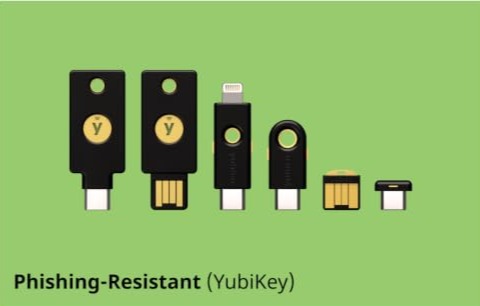
A YubiKey is a physical, hardware authentication device that supports the FIDO2 / U2F (Universal 2nd Factor) protocol. It utilizes asymmetric cryptography to verify your identity.
When you log in, the service sends a cryptographic challenge. The only way to solve that challenge is by physically tapping the gold contact on your YubiKey, proving you are physically present. The YubiKey verifies the URL directly with the browser. If a phishing site asks for authentication, the YubiKey refuses to sign the challenge because the domain doesn’t match the legitimate service. No physical key equals no access.
The Tactical Setup
You don’t need to secure your Netflix account with a YubiKey, but you absolutely must lock down the critical chokepoints of your digital life.
- The Master Email: Your primary email is the master key to everything else via password resets. Lock it down.
- The Password Manager: Your vault holds the keys to the kingdom.
- Financial Fortresses: Crypto exchanges and critical banking infrastructure. However, for ultimate asset protection, your crypto should be off exchanges entirely and secured in hardware like the Tangem Wallet.
The “Two is One, One is None” Rule
If you are serious about building a robust digital survival setup, start applying the fundamental principles found in our core survival guides. You can explore the full blueprint in our Zero Trust Survival Guide to build a comprehensive security strategy from the ground up.
In any SHTF scenario, redundancy is survival. The worst-case scenario with hardware keys is losing your only key and locking yourself out of your own digital life.
You must follow the tactical redundancy rule: Configure two YubiKeys simultaneously.
- Key 1 (Everyday Carry – EDC): Stays on your keychain for daily logins.
- Key 2 (Cold Storage): Registered to the exact same accounts, but kept strictly offline in a safe, ideally protected from electromagnetic pulses inside a SLNT Faraday Bag.

Frequently Asked Questions (FAQ)
What happens if I lose my YubiKey?
If you followed the “Two is One” rule, you simply use your backup key stored in your safe to log in, then immediately revoke the lost key from your accounts and register a new backup. Never rely on a single key.
Can a YubiKey be hacked remotely?
No. A YubiKey does not have a battery, Wi-Fi, or Bluetooth (unless you specifically buy a Bluetooth model, which is generally not recommended for maximum OpSec). It requires a physical connection (USB or NFC) and a capacitive touch from a human finger to authorize a login.
Does it work on smartphones?
Yes, modern YubiKeys feature NFC (Near Field Communication) alongside USB-C. You can simply tap the key against the back of your secure device, such as a phone running GrapheneOS, to authenticate.
Hardware is the Final Perimeter
In cybersecurity, just as in physical survival, a physical barrier is always the strongest defense. By eliminating SMS 2FA and integrating YubiKey hardware authentication, you strip remote attackers of their most common vectors.
For Ethan, the cynical network architect in The Dawn of Resilience, typing a password on a potentially compromised keyboard without a hardware backstop is tactical suicide. His entire survival framework relies on physical verification before digital execution. Secure your perimeter before the network fails.