
The modern economy relies heavily on distributed digital labor. If you work from home, your laptop is not just a tool; it is your sole source of income.
When a rolling blackout or a severe storm knocks out the grid, your ability to earn a living drops to zero the moment your battery dies.
A remote work power outage is a direct threat to your financial security. Traditional preppers focus on food and water, but the modern urbanite must also prep their workstation.
You cannot rely on the fragile municipal grid to protect your livelihood. We are going to explore how to build a resilient, off-grid power ecosystem right in your home office, ensuring that your digital sovereignty remains intact even when the city goes dark.
The Financial Cost of Downtime
Every hour you spend offline during a remote work power outage is lost revenue, missed deadlines, and compromised client trust.
If you are a freelancer, a day without power can mean a lost contract. If you are an employee, prolonged unreachability can damage your standing.
You cannot simply tell a global client that your local power grid failed. In the digital economy, connectivity is a baseline expectation.
Your laptop’s internal battery is designed for a commute, not a crisis. Once it depletes, usually within a few hours, you are entirely disconnected from the digital world.
Building a Resilient Home Office
To immunize yourself against a remote work power outage, you need a localized energy bridge.
Gas generators are useless for an apartment dweller, and cheap power banks lack the capacity and output required to run a high-performance laptop and external monitors.
The Portable Power Station Solution
The ideal hardware for the remote professional is a LiFePO4 portable solar generator.
These units are completely silent, meaning they won’t interfere with your Zoom calls, and they emit zero fumes, allowing you to keep them directly on your desk.
A mid-sized power station can recharge a modern MacBook Pro or a high-end Windows laptop dozens of times. Furthermore, the Pure Sine Wave AC outlets ensure that the power delivered is as clean as what comes from the wall, preventing any damage to your expensive motherboard.
Bypassing the AC Brick with USB-C PD
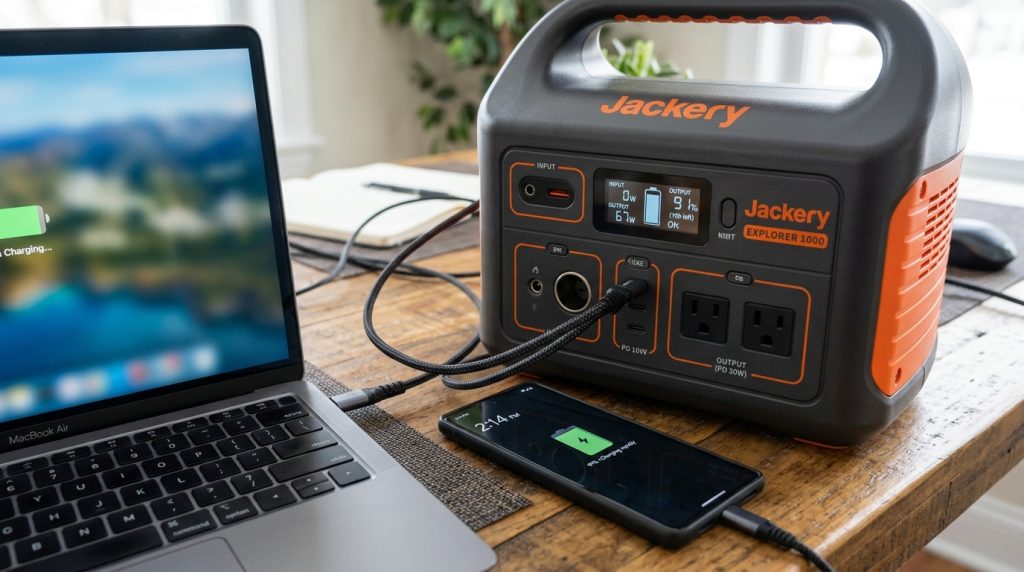
For maximum efficiency during a remote work power outage, you should bypass your laptop’s bulky AC adapter entirely.
Modern portable power stations feature high-output USB-C Power Delivery (PD) ports. By plugging your laptop directly into the power station via USB-C, you eliminate the energy loss that occurs when converting AC to DC power.
This hyper-efficient setup stretches your battery reserves significantly, allowing you to work longer on a single charge.
The Long-Term Outage: Solar Recharging
If the grid failure extends beyond a single day, a battery alone is not enough. You must have the ability to generate your own electricity.
This is where foldable solar panels become critical. While you are working on your laptop inside, you can deploy a solar panel on your balcony or outside a window.
The panel harvests the sun’s energy and feeds it directly into your power station, replacing the energy your laptop is drawing.
This closed-loop system ensures that a remote work power outage does not end your career. You become entirely self-sufficient, turning your apartment into an autonomous digital bunker.
Protect your income and your digital sovereignty. Don’t let a failing grid dictate your ability to work.
Read our full Jackery Review: The Essential Power Station for Urban Survival
FAQ: Remote Work Power Outage
How can I charge my laptop during a power outage?
The most reliable method during a remote work power outage is a portable solar power station. It offers massive capacity and clean AC or USB-C power, allowing you to charge your laptop multiple times safely indoors.
Can a power bank run a laptop?
Most standard phone power banks lack the wattage to charge a laptop. You need a dedicated power bank with at least a 60W USB-C PD output, or better yet, a high-capacity portable power station for serious remote work.
How long will a solar generator run a laptop?
A laptop typically draws between 30 and 60 watts. A 500Wh solar generator can power a standard laptop for roughly 8 to 12 hours continuously, making it an excellent bridge for any remote work power outage.
The grid is fragile, but your mind doesn’t have to be. Hardware is only the first step. To truly survive the collapse of our physical and digital infrastructure, you need the right mindset.

Download Chapter 1 of The Dawn of Resilience for FREE and start your journey.